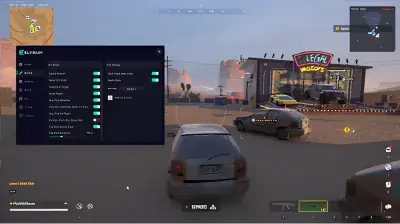
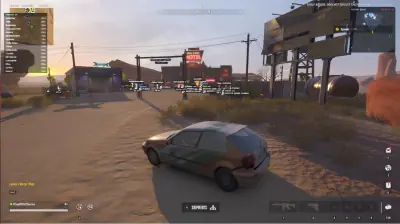
Combat, getaways, heists and clan raids each have their own controls. Enable the information that fits the activity.
Player ESP
Read the situation.
Identify roles, clan tags, health, armor and held items. Visible and hidden colors help separate what is in view from what is behind cover.
Box styles and skeleton
Cop, Robber, Civilian and NPC tags
Health, armor and action states
Out-of-screen arrows
Distance and team filters
Loot & security
Follow the heist.
Mark cash, bags, containers and valuables alongside cameras, alarms, vault doors and hideout entrances. Filter loot by category and minimum value.
Item icons and prices
Safes and workbenches
Camera coverage cones
Heist objective markers
Aimbot
Choose your targets.
Set FOV, smoothing, prediction and target bones. Role, visibility and clan filters narrow which characters the aim module can select.
Aim key and forced aim key
Head, neck, chest or pelvis
Scoped-only targeting
Distance and switch delay
Weapon controls
Separate handling options.
No Recoil and No Spread (Soft) are listed independently of target selection. Review the current build before relying on a weapon option.
No Recoil
No Spread (Soft)
Custom crosshair
Build-dependent behavior
2D radar
Keep the wider picture.
Distance rings and an FOV cone provide a compact view of players, vehicles, loot and objectives. Adjust range, size and zoom for the information you need.
Adjustable range and zoom
Auto zoom
Off-screen indicators
Player list
Triggerbot
A separate firing module.
Give triggerbot its own key and choose Hold or Toggle. Hitbox scale, reaction delay, visible-only checks and distance limits control when it activates.
Head, body or legs
Reaction delay
Hold or Toggle
Clan and vehicle filters
Vehicle & base ESP
Follow chases and raids.
Read vehicle fuel, health, locks and occupancy. Base markers show ownership, raid state, timers and production stations.
Garage and spawn markers
Hide your own vehicle
Base owner and clan
Raid lock timer
Banks & roulette
Keep economy markers distinct.
Toggle bank, ATM and roulette markers separately. The roulette HUD displays phase, timer, results and history; betting modes do not guarantee a return.
Bank and ATM markers
Phase and timer HUD
Recent results history
Flat and progression modes
Configs & battle mode
Control screen clutter.
Save menu profiles, set a panic key and switch to a combat view that hides world labels. A stream-proof overlay is listed for capture privacy.
Save and load configs
Custom menu and panic keys
Enemy-only battle view
Stream-proof overlay
Store
Our products
Explore the Rob Run menu and three separate utilities. Each page explains its own requirements and purpose.
Compare documented menu features and setup requirements. Availability elsewhere varies by product; the comparison does not promise a safer account.
ROB RUN HACKSOther providers
Role-aware aiming
Choose Cop, Robber, Civilian or NPC targets and exclude your team or clan.
Readable ESP
Control box styles, visible and hidden colors, distances and the labels that appear.
Setup tickets
Ask for help with Windows requirements, Cloud DMA setup and digital delivery.
Saved configurations
Save and load profiles instead of rebuilding your menu settings each session.
Steam requirements
Windows 10/11, security settings enabled and Cloud DMA for full supported functionality.
Combat display control
Battle mode can hide world labels and keep enemies visible during a fight.
Steam
Supported platform
The product is listed for the Steam version of Rob Run.
10 / 11
Windows support
HVCI, Core Isolation, TPM and Secure Boot are listed as enabled.
Configs
Your menu profiles
Save and load separate views for combat, driving or looting.
Setup guide
Prepare Rob Run with three setup checks
Confirm your Windows environment and Cloud DMA requirements before checkout. License keys are delivered digitally; support tickets cover setup questions.
Check your Windows environment
Confirm the Cloud DMA setup
Follow the delivered guide
How it works
From requirements to a saved config.
Make the platform and dependency checks before configuring a Rob Run menu.
Answers for this page. The FAQ page holds the rest.
Ask ticket support to confirm the current Steam build before purchase or use. A feature list or dated guide is not live status.
License keys are delivered digitally after checkout. Follow the current supplied setup guide and use ticket support for installation questions.
Yes. Third-party software may break game rules and lead to account penalties. Stream-proof capture and an isolated environment do not guarantee safety.
The Steam version of Rob Run on Windows 10 or Windows 11 is listed. Other storefronts, consoles, Linux and macOS are not established as supported.
Ask support about current device and transfer terms before moving a license. The supplied product facts do not establish a fixed number of resets or transfers.
Open the product catalog for the main menu and three separate utilities. Each has its own requirements and purchase route.