
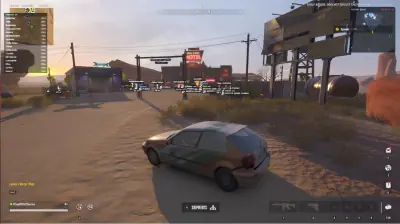
Rob Run player ESP: roles, visibility and readable labels
Learn what player ESP, glow and action labels show, and how filters keep the Rob Run display readable.
Rob Run player ESP combines identity, role and condition information. A name alone says little about whether a character is a cop, belongs to your clan or is already downed. The menu offers separate fields and display controls so you can decide which information belongs on screen. It also distinguishes player ESP from the glow module.
Choose useful fields
The documented box styles are Full, Corner, 2D and 3D, with fill available. Skeleton and head circle add body references. Health can appear as a bar or text, and armor or shield information has its own readout. Name or alias, clan tag and held weapon or item explain who a marker represents and what they carry.
Role tags include Criminal, Cop, Civilian and NPC. The aim list uses Robber terminology; labels need not be identical across modules. Police highlight and wanted or heat state are also listed. Check which field produced a label before assuming it is a target-selection rule.
Visibility and distance
Visible and hidden colors distinguish states without another long label. Distance fading and maximum player distance limit the display’s reach. Hide-team can remove friendly markers. A crowded scene is a reason to review categories and ranges rather than enable every available field.
Consider which identity field and condition field you need to read together. The product does not publish a tested palette or distance preset for every resolution. Keep contrast readable against the game scene and compare changes one group at a time so a missing marker has an explainable cause.
Action states and off-screen information
Shooting, running, reloading, arrested and downed states are listed alongside vehicle occupancy. Snaplines, out-of-screen arrows and an aiming-at-you indicator add context. These displays do not guarantee that a character will remain in the same state or that an encounter will have a particular result.
The 2D radar can provide a wider summary when labels crowd the world view. A radar marker and a world label serve different display purposes, even when they refer to the same character.
Glow and battle mode
Glow offers Outline, Fill and Combined styles, custom colors, a separate police color, material chams and a maximum distance. Check glow and player ESP when troubleshooting overlapping visuals. Turning off a box does not necessarily turn off another module’s highlight. Battle mode can hide world labels and keep enemies visible, so include its state in a configuration review.
Read the product requirements and setup FAQ before purchase. Steam, Windows 10/11 and Cloud DMA requirements apply. ESP and stream-proof capture do not remove account risk.