
Buying Rob Run Hacks: requirements, delivery and setup
Review documented features, the Cloud DMA dependency, external checkout and support before buying.
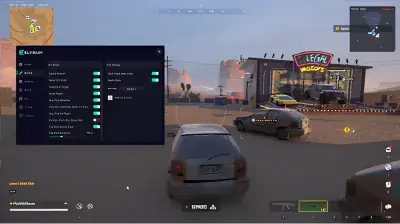
Choose Rob Run Hacks by matching the documented menu to the information and controls you want, then checking the complete environment. Aim, triggerbot, player and vehicle ESP, loot and security markers, radar, base information and economy helpers are listed. The purchase also depends on Steam support, Windows settings and Cloud DMA requirements.
Match the menu to the task
For combat, review role filters, target selection and triggerbot conditions. For driving or heists, inspect vehicle data, security markers and loot categories. Clan features include tags, base ownership and raid timers. These are tools, not promises of successful fights, raids or earnings.
Use the full product page and the aim guide or heist guide for explanations. These guides describe controls without invented presets or test results. A short feature name should be backed by what the module displays or changes.
Confirm the complete environment
The product lists Steam on Windows 10/11, with HVCI, Core Isolation, TPM and Secure Boot ON. Cloud DMA is required for full functionality on supported builds. Ask about the current Steam build and Windows edition, particularly after Early Access updates.
Cloud DMA has its own infrastructure and service requirements. Read its product page and confirm separately purchased components. Static Server and AWS can be alternate service labels. Ask for an itemized list instead of guessing the bundle from a short description.
External checkout and delivery
Purchase buttons lead to external checkout, where current options and access terms are shown. Confirm the selected product before payment. The main license and utilities have separate scopes. HWID Spoofer and Skin Changer are not documented Rob Run dependencies and should not be added on that assumption.
Keys are delivered digitally. The supplied facts establish no exact delivery-time guarantee, fixed transfer allowance or refund outcome. Read the terms in the purchase flow and ask about material uncertainties before paying.
Setup and useful tickets
Follow the current delivered guide. Record Windows edition, game build and exact errors when a step fails. Use support tickets and the FAQ. Keep keys, credentials and payment details private. Save menu profiles through the config system once the controls are understood.
An article is not proof of live patch compatibility. Confirm current support when needed. Third-party software may violate game rules and lead to account action. Stream-proof capture, conservative settings and an isolated environment do not guarantee account safety.