
ROB RUN HACKS for Steam
Choose role-aware aim controls, detailed player and vehicle ESP, loot and security markers, or a compact 2D radar. Windows 10/11 and Cloud DMA are listed requirements for full supported functionality.
Product Overview
At a glance
Key capabilities
The short list for ROB RUN HACKS, before the full module list.
Another 17 options are in the full list below.
Overview
Rob Run tools for combat, driving and heists
How the listed modules, requirements and setup fit Rob Run.
Spot the role, vehicle or objective that matters to the task. Rob Run Hacks brings detailed ESP, a configurable aiming module, triggerbot and a 2D radar into one Windows menu for the Steam version of Rob Run.
Use category filters and saved profiles to build a focused view for looting, clan fights or a getaway. Full supported functionality requires Cloud DMA. Check the complete environment and current build before choosing purchase options.
Rob Run moves between shootouts, getaways and heist preparation. Rob Run Hacks puts the information for those activities in separate modules, so a driving view can focus on vehicles while a looting view focuses on bags, containers and value filters. The main menu combines aiming assistance, triggerbot, ESP, glow, radar, base information and bank or roulette tools.
Aiming with role and clan filters
The aimbot has an aim key, forced aim key and lock-target option. Limit selection to scoped-in use or visible targets, choose Cop, Robber, Civilian or NPC roles, and skip dead, knocked, vehicle, team or clan targets. Target priority can follow distance or proximity to the crosshair. A maximum aim distance and switch delay put boundaries around selection.
FOV defines the selection area, with a circle you can draw on screen. Smoothing changes the adjustment, prediction is a separate listed option, and bone choice includes Head, Neck, Chest, Pelvis and Closest. These are controls to configure, not promises of accuracy or an undetectable play style. Battle mode can hide the FOV circle.
Triggerbot has its own activation
Triggerbot uses a separate key and offers Hold or Toggle. Head, Body and Legs are listed hitboxes, with a hitbox scale, reaction delay and maximum distance. Visible-only checks and exclusions for dead, knocked, vehicle and clan targets let you define its scope independently of the aimbot.
Player information that you can simplify
Player ESP offers Full, Corner, 2D and 3D boxes with fill, skeleton and head circle. Health can be shown as a bar or text, alongside armor or shield information. Names, aliases, clan tags, role labels and held weapons help identify who a marker represents. Action labels include shooting, running, reloading, arrested and downed states.
A police highlight and wanted or heat state add Rob Run-specific context. Snaplines, off-screen arrows and an aiming-at-you indicator are also listed. Separate visible and hidden colors, distance fading, a maximum player range and hide-team controls help reduce clutter. Glow is its own module with Outline, Fill and Combined styles, custom colors, police colors and material chams.
Vehicles, loot and the route through a heist
Vehicle ESP can show name, distance, owner or free status, locks, health, fuel, speed, engine and cargo. Filter empty or occupied vehicles, select Police, Robber, Civilian or Unowned categories, and hide your own vehicle. Garage and spawn markers sit alongside these readouts. A label does not provide access to a locked vehicle.
World markers cover dropped cash and items, loot bags, containers and cargo. Item icons, prices, category filters and minimum value let you prioritize the display. Weapons, ammunition, armor, medicine, keys, tools and valuables have separate filters. Safes, workbenches, hideout entrances, territory points, heist objectives and traders are also documented.
Security markers identify cameras, including broken or disabled units, and can draw a coverage cone. Guard posts, alarms, security panels, ordinary doors, vault doors and medical cabinets are listed too. These markers provide information; they do not promise to disable security or unlock a door.
Base raids and a compact radar view
Base ESP covers owner or clan, buildings and outbuildings, raid state and raid lock timer. Defense blocks, modules, workbench timers, the money laundering station, cargo opening or exchange and the crypto farm are included in the documented list. Hide-own-base keeps your own location out of the display.
The 2D radar can combine players, vehicles, loot, cameras, hideouts, objectives, banks and roulette markers. Adjust range, size, zoom or auto zoom and use distance rings or an FOV cone. Off-screen indicators, a player list and game map markers are also listed. Battle mode can temporarily hide world labels and keep enemies visible, with a clan battle side filter.
Bank and roulette tools have clear limits
Banks, roulette spots, cash nodes or withdrawal points, cash charging points and ATMs each have separate toggles. The roulette HUD displays phase, timer, winning number and recent results. Flat, Martingale and Reverse Martingale are listed betting-helper modes. They describe bet sizing; they do not establish a way to predict results or guarantee profit.
Menu profiles and capture privacy
Set custom menu and panic keys, save or load configs, and choose a custom crosshair. No Recoil and No Spread (Soft) are documented options. A stream-proof overlay is listed, but capture behavior depends on the recording path. Check a local recording before streaming and remember that capture privacy does not remove anti-cheat or account risk.
Requirements before you order
This product is listed for the Steam version of Rob Run on Windows 10 and Windows 11. HVCI, Core Isolation, TPM and Secure Boot are listed as ON. Cloud DMA is required for full functionality on supported builds. Confirm your Windows environment requirements, current game build and complete Cloud DMA setup before checkout.
Cloud DMA and the AWS option
Cloud DMA is the supporting product named in the Rob Run requirements. An AWS option is also mentioned, but the supplied product information does not explain its implementation. Ask support how that option relates to your installation and what must be purchased separately. Do not assume that buying the main license includes every setup component.
Digital delivery and setup help
License keys are delivered digitally after checkout. Follow the current supplied guide rather than guessing an installation order from an older video. If activation or setup fails, open a support ticket with the product name, Windows version, Steam build and exact error. Keep license keys and private credentials out of public posts.
Updates and account risk
Rob Run is in Early Access. The product listing describes maintained builds and a live status page, but this page cannot guarantee that a feature works on every new patch. Confirm current availability through support before purchase or use. Third-party game software can violate the game rules and lead to account penalties, regardless of overlay settings or setup isolation.
Modules
What's included
The full option list for ROB RUN HACKS. Each line can be switched in the menu.
- Aimbot with aim and forced aim keys
- FOV circle, smoothing and prediction
- Head, Neck, Chest, Pelvis or Closest bone
- Cop, Robber, Civilian and NPC filters
- Visibility, team and clan checks
- Triggerbot with Hold/Toggle and reaction delay
- Full, Corner, 2D and 3D player boxes
- Skeleton, health, armor and action states
- Police highlight, heat state and clan tags
- Outline, Fill and Combined glow; material chams
- Vehicle owner, lock, health, fuel and cargo ESP
- Loot categories, item icons and minimum value
- Cameras, alarms, vault doors and objectives
- Base ownership, raid timers and production stations
- 2D radar with range, zoom and distance rings
- Bank, ATM and roulette markers
- Roulette phase, timer and recent results HUD
- Flat, Martingale and Reverse Martingale helpers
- Battle mode and clan battle side filter
- Custom menu key, panic key and crosshair
- No Recoil and No Spread (Soft)
- Stream-proof overlay
- Save and load configs
Experience
Menu layers · After checkout
The supplied captures show Rob Run. Read the documented modules, then review digital delivery and setup requirements.
In-game layers
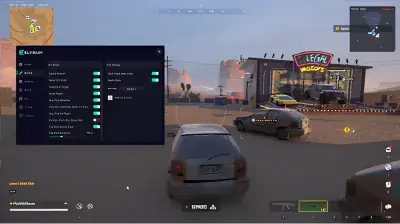
- Layer A
Vehicle scene and menu
Supplied Rob Run capture with the settings menu and radar visible.
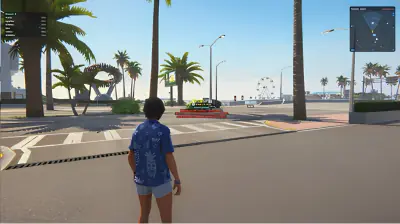
- Layer B
Street view and radar
Supplied Rob Run capture showing a street scene and the radar display.
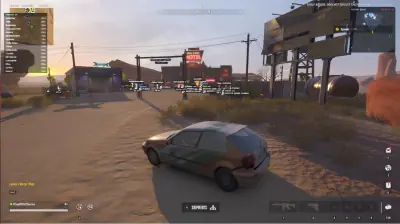
- Layer C
Player markers in view
Supplied Rob Run capture with player labels and distances near a motel.
More products
Other catalog products
Separate utilities with their own documented scope. Check compatibility on each product page.
- HWID Spoofer Review hardware identifier changes and the included trace cleaner. Rob Run support is not established by an anti-cheat family listing. View details: HWID Spoofer
- Cloud DMA Prepare a Hyper-V environment on one Windows PC. Check the separate service requirements for the Rob Run setup. View details: Cloud DMA
- Skin Changer Preview cosmetic finishes locally in supported titles. Confirm your exact game before purchase; Rob Run coverage is not documented. View details: Skin Changer
FAQ
Questions about this page
Answers for this page. The FAQ page holds the rest.
Blog
Related guides
Choose a topic for detailed menu explanations, device checks and product boundaries.
Understand aim keys, FOV, role filters and triggerbot activation before configuring the Rob Run menu.
Learn what player ESP, glow and action labels show, and how filters keep the Rob Run display readable.
Compare vehicle, base and radar modules for chases, clan activity and a less crowded world view.
Understand loot value filters, cameras, vault doors and objective markers without confusing information with access.
Separate bank markers, roulette history and bet-sizing modes from unsupported predictions or profit claims.
Review documented features, the Cloud DMA dependency, external checkout and support before buying.
Rob Run community forum
Read discussion
Read-only editorial examples about Rob Run features, requirements and limitations. These are fictional discussions, not user submissions.
- Features & Customization Can player ESP tell cops apart from the rest of Looty Bay? Trying to understand the labels before getting lost in the options. Does player ESP just put a box around everyone, or can it tell a cop from a criminal or…
- Features & Customization Smaller FOV or a role filter: which one actually changes the target list? Suppose someone wants the aim module to consider a narrower group of characters. Would reducing the FOV handle that, or would they still need the role and…
- Features & Customization Radar range and player ESP distance aren't the same slider, right? The radar description has range, size and zoom, while player ESP has a maximum player distance. If a marker is on one view but not the other, would it make…
- Features & Customization Would a minimum loot value filter hide a key I still need? Hypothetical problem: a profile is set up to show valuable loot, but then somebody needs a particular key or tool for a heist. Could the value filter work…