
Rob Run aimbot and triggerbot: how the controls differ
Understand aim keys, FOV, role filters and triggerbot activation before configuring the Rob Run menu.
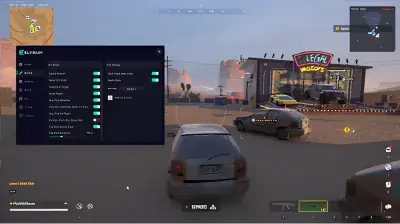
Aimbot and triggerbot answer different questions in Rob Run. Aimbot controls target selection and aim adjustment. Triggerbot is a separate firing module with its own activation key. Reading both groups as one switch makes it harder to understand why a target is selected or why a shot is triggered. Start with the documented controls, then confirm what the current Steam build supports.
Start with eligible targets
The aim module lists Cops, Robbers, Civilians and NPCs as selectable roles. Team and clan exclusions matter when a group is moving through Looty Bay together. Dead, knocked and in-vehicle targets can also be excluded. A visibility check and scoped-only option further restrict selection. These filters define eligibility; changing FOV alone does not replace them.
For example, a profile intended for a clan fight can use the clan exclusion and a limited role selection. The feature list does not supply recommended numeric values or tested presets. Any example here describes the purpose of a control rather than a verified configuration for a particular weapon.
FOV, bones and switching
FOV sets the selection area and has an optional circle. Smoothing and prediction are listed controls, while Head, Neck, Chest, Pelvis and Closest are the bone choices. Target priority can use Closest or Crosshair. A maximum distance and target switch delay limit which candidates are considered and when selection changes.
Aim key, forced aim key and lock-target are separate options. Check the delivered guide for their exact behavior on your build. Battle mode can hide the FOV circle, so the absence of a circle does not prove that aim is disabled. Review module state in the menu when diagnosing a confusing view.
Triggerbot has its own conditions
Triggerbot offers Hold or Toggle, Head/Body/Legs hitboxes, hitbox scale and reaction delay. It has visible-only and maximum-distance settings, plus dead, knocked, vehicle and clan exclusions. Check both aim and triggerbot groups if behavior seems inconsistent. Record the activation mode, filters and distance caps before changing several settings, then save the profile through the config system.
Requirements and next step
The complete feature list is on the Rob Run Hacks product page. The product is Steam only, supports Windows 10/11 and requires Cloud DMA for full functionality on supported builds. See the Windows guide before buying. Third-party software may break game rules and lead to account action; subtle settings do not establish safety.